
Speak in your normal workflow
Final Word monitors the selected microphone and recognizes when speech begins. Start and continue thresholds can be adjusted for the room, microphone, and speaking style.
Professional Windows dictation
Final Word turns natural speech into live text and places it at the active cursor in Microsoft Word, email, browser forms, MyEMR, and virtually any Windows application.
From speech to the active window
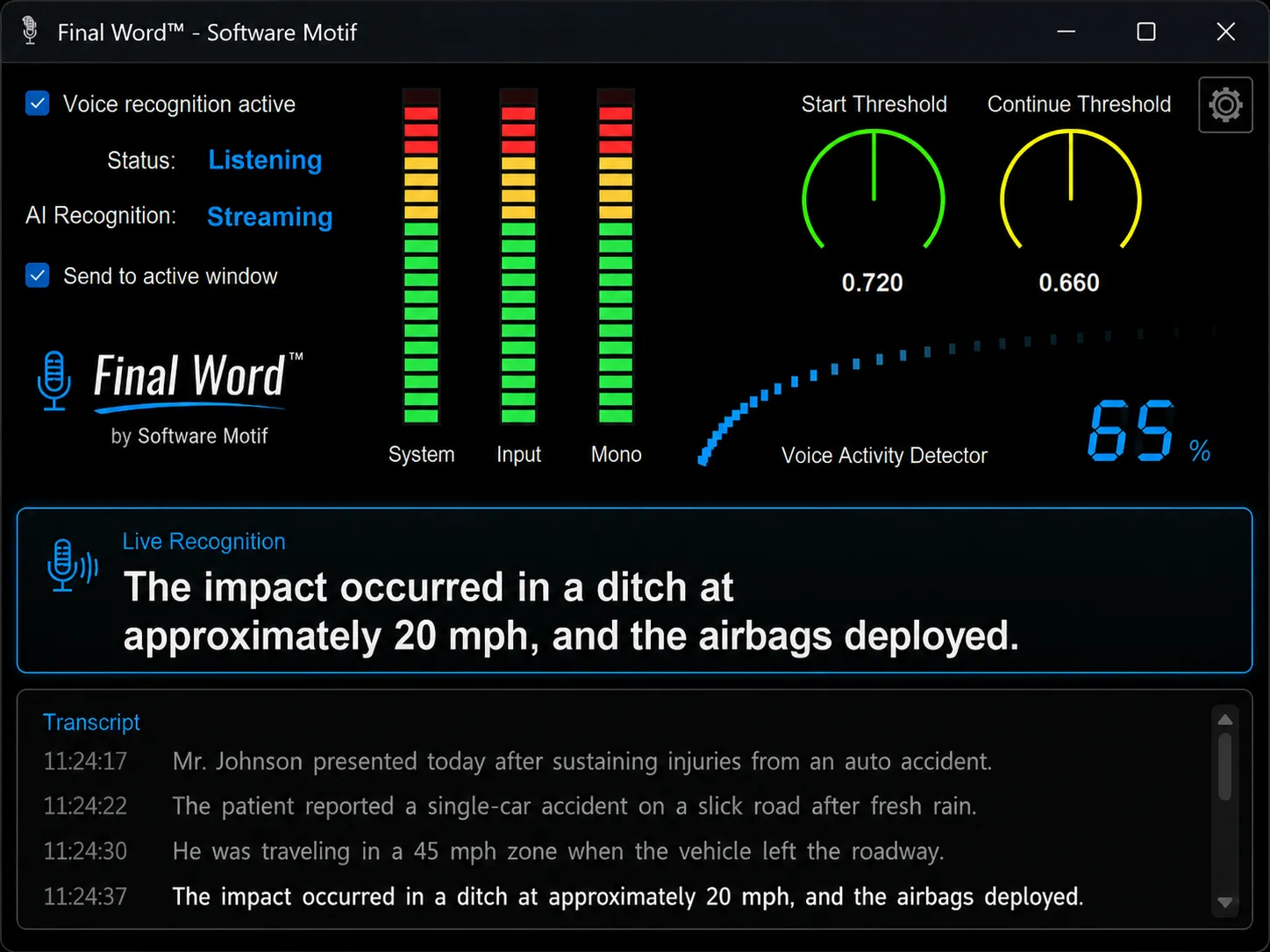
Final Word combines voice activity detection, AI speech recognition, and active-window text insertion in a focused Windows desktop application.
Final Word monitors the selected microphone and recognizes when speech begins. Start and continue thresholds can be adjusted for the room, microphone, and speaking style.
Status indicators and audio meters make listening, streaming, processing, and returned text visible instead of hiding the recognition pipeline.
Completed phrases can be sent to the active cursor in MyEMR, Microsoft Word, email, browser forms, and virtually any Windows application.
Control without interruption
Final Word keeps the essential controls, audio feedback, transcription results, and session history in one clear workspace.
Use speech for the passages that are faster or more natural to say, then review the returned text before continuing in the document, message, form, or professional record already on screen.
Understand the terminologyFine-tune when speech recognition begins and how it responds to natural pauses.
Review the most recent recognized phrase before moving on.
Keep earlier recognized phrases available for review and copying during the session.
Send recognized text to the cursor position in the application already in use.
Follow system, direct input, mono, and voice activity levels in real time.
Give support staff a clearer view of input, detection, recognition, and returned text.
A visible recognition pipeline
Professional audio-style monitoring helps distinguish microphone input from speech detection and recognition activity. The main experience remains straightforward while useful technical detail is available when it is needed.
The person dictating sees an understandable status. Technical staff can inspect the stages behind that status.
Professional Windows voice typing
Final Word is designed for live speech-to-text at the active cursor, making voice available across everyday writing and specialized documentation workflows.
Place recognized passages into the document at the current cursor instead of moving text from a separate transcription service.
Speak detailed replies, professional letters, and other text where the message is being composed.
Use live dictation in compatible browser-based text fields without changing the central recognition workflow.
Capture free-form detail in the active field while the surrounding application provides its own structure and workflow.
A specialized Software Motif use case
Final Word also connects naturally with MyEMR and the broader Software Motif product family when chiropractic practices need spoken detail inside a structured clinical and administrative workflow. Our chiropractic dictation software review explains what to compare beyond transcription accuracy.
Terminology guide
These terms overlap, but they describe different parts of the experience. Learn what each one means and which questions matter when evaluating Windows voice recognition software.
Read the general guide
Specialized guide
It's most useful when it supports—not replaces—structured SOAP notes, reusable language, provider review, and the workflow between clinical documentation and billing.
Read the chiropractic dictation software guideBring voice into your Windows workflow
Talk with Software Motif about live AI voice recognition, active-cursor dictation, and specialized MyEMR integration.